
Invoice Management System (IMS) under GST: A Practical Guide for Businesses and CAs
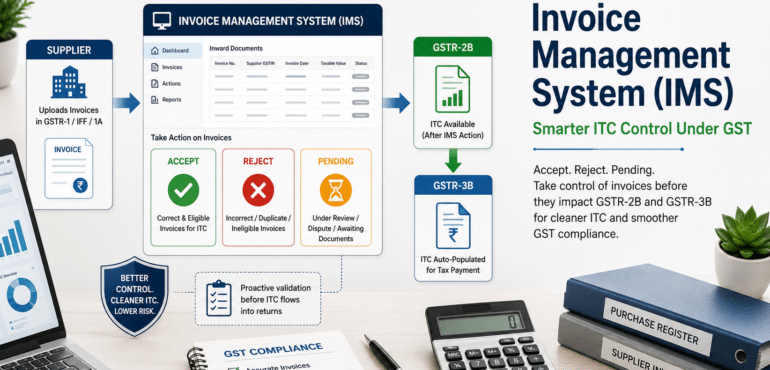
The Invoice Management System (IMS) on the GST portal is quietly transforming how taxpayers manage Input Tax Credit (ITC). It gives recipients a structured way to accept, reject or keep invoices pending before they impact GSTR‑2B and GSTR‑3B. In other words, IMS is no longer “just another feature” on the portal – it is becoming a central control point for clean ITC and smoother GST compliance.
What exactly is the Invoice Management System?
IMS is a dedicated dashboard on the GST portal where a recipient can see all invoices, debit notes and credit notes reported by suppliers through GSTR-1, IFF or GSTR-1A.
Instead of passively waiting for invoices to appear in GSTR-2B, the recipient can proactively act on each document by choosing one of three options:
- Accept
- Reject
- Keep Pending
Only after this action layer does the data flow into GSTR-2B and then into GSTR-3B.
Practically, that means IMS sits between the supplier’s GSTR-1 and the recipient’s ITC claim, giving businesses a much-needed filter before tax credits are locked into returns.
IMS was rolled out from October 2024 and has since been enhanced with more document coverage and tighter linkages to GSTR-2B and GSTR-3B. Over time, as auto-population and “hard-locking” of returns become stricter, IMS is expected to be a non-negotiable part of monthly compliance routines.
Why did the government introduce IMS?
Before IMS, the typical workflow for ITC was:
- Supplier uploads invoices in GSTR-1/IFF.
- Recipient checks auto-drafted GSTR-2B.
- Finance team reconciles GSTR-2B with the internal purchase register, mostly using spreadsheets or third-party tools.
The challenge was that GSTR-2B often contained:
- Wrong invoices (wrong GSTIN, wrong tax, wrong place of supply).
- Duplicate invoices.
- Invoices relating to disputes or commercial disagreements.
- Invoices that were legally ineligible for ITC.
If these slipped through and ITC was claimed, businesses faced cash flow hits, reversals, interest liabilities and, in some cases, scrutiny or notices.
IMS addresses this by introducing a recipient-side control panel. Instead of waiting for mismatches to surface later, recipients can deal with problematic invoices upfront. It improves the quality of tax data flowing into GSTR-2B and significantly reduces the scope for unpleasant surprises at a later stage.
Where does IMS sit in the GST compliance chain?
A simple way to visualise IMS is as a bridge between three well-known returns:
- Front end: Supplier’s GSTR-1 / IFF / GSTR-1A (outward supplies).
- Middle layer: Recipient’s Invoice Management System (IMS).
- Back end: Recipient’s GSTR-2B and GSTR-3B (ITC and tax payment).
The flow is:
- Supplier saves or files invoices in GSTR-1/IFF/1A.
- These documents appear in the recipient’s IMS dashboard, typically within the same cycle.
- The recipient reviews each document and marks it as Accepted, Rejected or Pending.
- Accepted (and deemed accepted) documents flow to the “ITC Available” section of GSTR-2B and auto-populate ITC in GSTR-3B.
- Rejected documents fall into the “ITC Rejected” bucket, and no ITC is auto-filled for them.
- Pending documents are temporarily kept out of the relevant period’s GSTR-2B and remain on the IMS dashboard for later action, subject to time limits.
This also means that doing nothing is, in most cases, equivalent to accepting the invoice. Where no action is taken, the system treats the invoice as “deemed accepted” when GSTR-2B is generated for that period.
The three core actions: Accept, Reject, Pending
IMS is built around three actions for every inward document, and each carries distinct implications for ITC.
Accept
Use Accept when:
- Supplier details match your purchase register and accounts.
- There is no legal bar on claiming ITC.
- The invoice is commercially agreed and not under dispute.
Once accepted, the invoice:
- Moves to the “ITC Available” section of GSTR-2B for that period.
- Auto-populates ITC in the respective table of GSTR-3B (subject to other legal conditions).
Reject
Use Reject when:
- The invoice is not yours (wrong GSTIN, wrong PAN, unrelated trade name).
- The invoice contains major errors in taxable value, tax rate or place of supply.
- The invoice relates to a transaction that has been cancelled or never actually took place.
Once rejected:
- The invoice appears in the “ITC Rejected” section of GSTR-2B for that period.
- ITC is not auto-populated in GSTR-3B.
For suppliers, a rejection is an unambiguous signal to correct the document through an amendment or fresh reporting in subsequent GSTR-1/IFF.
Pending
Use Pending when:
- There is a commercial dispute (short supply, quality issue, pricing disagreement).
- The invoice has reached you, but goods/services are not yet fully received.
- You are awaiting internal approvals or more documentation before taking a call.
Pending invoices:
- Do not impact GSTR-2B and GSTR-3B for the current period.
- Remain visible on the IMS dashboard for later action (within prescribed timelines).
What does not get covered through IMS?
It is important to understand that IMS does not handle every ITC situation. Certain categories may bypass the IMS action layer and flow directly based on legal rules, for example:
-
Invoices where ITC is not available due to place‑of‑supply provisions.
-
Invoices that are time‑barred under section 16(4) of the CGST Act.
-
Reverse charge cases, where the recipient pays tax and claims ITC directly based on self‑invoicing.
For such items, the traditional discipline of reading the law, checking eligibility and maintaining robust working papers continues to be essential. IMS is a powerful operational tool, but it does not override the statutory conditions for ITC.
IMS vs Purchase Register vs GSTR‑2B
For most businesses, three documents now form the backbone of ITC reconciliation:
-
Purchase Register (PR) – Your internal accounting record.
-
IMS – The control dashboard showing what suppliers have reported and how you have acted.
-
GSTR‑2B – The auto‑drafted statement used to pre‑fill ITC in GSTR‑3B.
A robust monthly process usually involves:
-
Matching IMS records with the purchase register.
-
Taking final actions (Accept / Reject / Pending) in IMS.
-
Ensuring the GSTR‑2B that is generated aligns with those IMS actions.
-
Reconciling GSTR‑2B with the purchase register before filing GSTR‑3B.
When you match IMS with your purchase register, invoices typically fall into four buckets:
-
Matched: All key fields match – ideal candidates for Accept.
-
Minor differences: Rounding issues or minor narrations – may still be acceptable, but document reasoning.
-
Mismatch: Differences in values, tax rates or GSTIN – recheck and consider Pending or Reject.
-
Missing: Present only in IMS or only in the purchase register – trace the gap before deciding.
The goal for a disciplined finance function is that, by the time GSTR‑3B is filed, IMS actions, GSTR‑2B and the purchase register tell one consistent story.
Benefits of IMS for businesses and CAs
When used deliberately, IMS offers clear upside beyond “tick‑box” compliance:
-
Cleaner ITC and fewer disputes
Early identification of wrong or suspicious invoices reduces the chance of inadvertently claiming ineligible ITC and later having to reverse it with interest. -
Better vendor governance
Rejections and long‑pending invoices send a clear signal to suppliers about data quality and timeliness. It becomes easier to push for corrections when the system itself flags your actions. -
Operational efficiency at scale
Filters, summaries, bulk actions and Excel exports help large organisations handle thousands of invoices each month far more efficiently than purely manual reconciliations. -
Audit‑ready documentation
IMS actions, coupled with internal notes and remarks, create a neat trail explaining why a particular invoice was accepted, rejected or parked – extremely useful during audits and departmental reviews.
For chartered accountants, IMS is also a strong opportunity to move from reactive reconciliation work to proactive advisory – designing better controls, dashboards and workflows for clients.
Step‑by‑step: How to use IMS as a recipient
A simple, repeatable approach can help teams use IMS correctly every month.
1. Access the IMS dashboard
-
Log into the GST portal.
-
Navigate to: Dashboard → Services → Returns → Invoice Management System (IMS).
-
You will typically see tiles for Inward Supplies (as recipient) and Outward Supplies (as supplier).
2. Open Inward Supplies and read the advisory
-
Click on “View” under Inward Supplies.
-
An advisory will appear explaining that invoices without action may be deemed accepted when GSTR‑2B is generated.
-
Acknowledge and proceed to the summary screen.
3. Review summary and drill down
The summary groups documents by type, for example:
-
B2B invoices.
-
Debit notes and credit notes.
-
Amendments.
Choose a category (say B2B Invoices) and view the detailed invoice‑wise table. Use filters to slice by supplier, document number, date or current action status.
4. Compare with your purchase register
For each invoice (or bulk selection where appropriate):
-
Match supplier name and GSTIN.
-
Compare invoice number, date, taxable value and tax breakup.
-
Check if goods/services are received, and there is no major commercial dispute.
Based on this review, decide whether to Accept, Reject or keep the invoice Pending.
5. Save actions and add remarks where relevant
Once you choose an action:
-
Click Save to record it.
-
Use remarks especially when rejecting or keeping high‑value invoices pending; this is valuable context for future you, your team and your supplier.
You can revisit and change actions until GSTR‑3B is filed for that period. If you change actions after GSTR‑2B is generated, you should regenerate GSTR‑2B so that your ITC reflects the updated status.
IMS from the supplier’s viewpoint
Suppliers are not passive in this process. They can see how recipients are acting on their invoices through the Outward Supplies view in IMS.
For each period, suppliers can:
-
See counts of invoices accepted, rejected, pending or left without action by their customers.
-
Drill down to invoice‑level details to understand which customers are rejecting or delaying which documents.
-
Export data to Excel to follow up internally or with customers.
This visibility helps suppliers:
-
Correct recurring errors (for example, wrong GSTIN, tax rate, or place of supply).
-
Align their GSTR‑1 reporting and GSTR‑3B liabilities with real‑world commercial positions.
-
Reduce the volume of ITC mismatch disputes raised by customers and their consultants.
For large vendors, periodic review of IMS outward data can be a powerful health check of invoicing discipline and master data quality.
What Chartered Accountants should focus on
For practising CAs and in‑house finance heads, IMS is a chance to upgrade monthly GST processes.
Some key focus areas:
-
Ownership and training
Clearly assign IMS responsibilities within the team – who reviews, who takes actions, who signs off. Train them not only on portal clicks but also on legal and practical implications of each action. -
Integration with ERP and reconciliations
Align vendor masters, purchase modules and ITC working files with IMS fields. Ideally, your reconciliation tool or ERP should be able to consume IMS export data and highlight mismatches automatically. -
Governance and documentation
Formalise a monthly calendar – when purchase registers close, when IMS reviews happen, when GSTR‑2B is regenerated (if needed) and when GSTR‑3B is finalised. Maintain soft copies of IMS exports, reconciliation files and justification for major rejections or reversals. -
Client advisory and dashboards
For firms handling multiple clients, IMS is an excellent candidate for standardised dashboards: ageing of pending invoices, top suppliers with frequent rejections, ITC at risk, and so on. These insights can be powerful discussion points with management.
Handled this way, IMS becomes part of a broader “tax data governance” framework – something boards and promoters understand and appreciate.
Practical checklist for businesses
To make IMS work without overburdening teams, consider adopting this simple checklist:
-
Fix a monthly IMS cut‑off – usually a few days before the 14th – by which purchase data is updated and IMS actions are substantially completed.
-
Treat borderline or disputed invoices as Pending or Reject until resolved, instead of accepting and later reversing ITC with interest.
-
Keep a sharper eye on critical vendors – those that contribute the bulk of your ITC or have a history of errors.
-
Use remarks systematically on high‑value rejections and pendencies; they save hours during audits and internal reviews.
-
Where invoice volumes are high, consider using specialised GST/IMS tools that connect ERP, IMS and GSTR‑2B to avoid manual uploads and downloads.
-
IMS: From compliance feature to control system
The Invoice Management System started as a portal enhancement but is steadily turning into a core control system for ITC. For businesses, it offers a way to bring discipline, transparency and audit‑readiness to GST data. For chartered accountants, it opens up a rich space to design better processes, reconciliations and dashboards for clients.
Used thoughtfully, IMS can help you claim the right ITC at the right time, minimise disputes and notices, and give management far greater confidence that GST has been “put on autopilot” – without losing control.